chronoline.js is a library for making a chronology timeline out of events on a horizontal timescale.
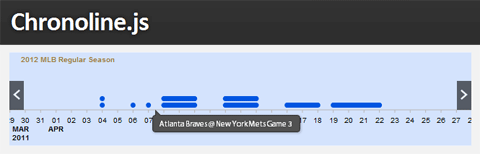
From a list of dates and events, it can generate a graphical representation of schedules, historical events, deadlines, and more. The timeline is is displayed horizontally, events placed on it can be any days long and details about the events are shown in a tooltip when hovered.

The library uses Raphael.js + jQuery and works only in modern browsers.

Support


  • raphael.js: 2.1.0
  • jQuery: 1.7.2
  • qTip2: 04/24/12 nightly

Browser support is:

  • Internet Explorer 8+ (except the tooltips)
  • Firefox 12+
  • Chrome 18+


Requirements: Raphael.js, jQuery, jQuery qTip2 plugin
Compatibility: All Modern Browsers
Website: http://stoicloofah.github.com/chronoline.js/

0 Shares:
Leave a Reply

Your email address will not be published. Required fields are marked *

This site uses Akismet to reduce spam. Learn how your comment data is processed.

You May Also Like

qTip2 – Advanced jQuery Tooltip Plugin

qTip2 plugin can display the tooltip in any position wanted, plays nicely with image maps and they can be set to follow any element (handy for drag 'n' dropped and animated items) or mouse.

5+ Useful jQuery Plugins for Images

We love jQuery for its flexibility and many uses. But some of the most impressive jQuery applications are those that involve images. It really can allow you to do some useful stuff and even add a “wow” factor to your project. So here we’ve rounded up some jQuery plugins to help you display images in your next project.

Detect screen size with jQuery and apply a CSS style

Sometimes we need to format the content differently according to the screen resolution of the user. One of the ways to do this is to simply detect the screen width using the screen.width property and change the stylesheet.